Drawing text on image works incorrectly if the image opacity is 0 #5431

Description

What did you do?
Wanted to draw text on an image with 0 opacity
What did you expect to happen?
RGB channels to have changed values only for the pixels of the letters:
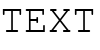
What actually happened?
The channels changed for the entire bounding box of the text:

Also if opacity for the image is >= 1, the font is ImageFont.load_default().font or the version of Pillow is 6.2.2, then I get the expected behavior.
What are your OS, Python and Pillow versions?
- OS: Ubuntu 18.04.5 LTS / MacOS 10.15.7
- Python: 3.7.8
- Pillow: 8.2.0
from PIL import Image, ImageDraw, ImageFont

font = ImageFont.truetype("Pillow/Tests/fonts/FreeMono.ttf", 40)
text = 'TEXT'
text_im = Image.new('RGBA', (100, 50), (255, 255, 255, 0))
draw = ImageDraw.Draw(text_im)
draw.text((0, 0), text, fill=(0, 0, 0), font=font)
r, g, b, _ = text_im.split()