quantize() has worse results on an identical image in RGBA mode instead of RGB #5217

Description

What did you do?
RGB image (no alpha) named test-input.png
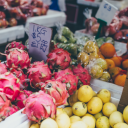
Ran the following code on it.
from PIL import Image

image = Image.open("test-input.png")

# The input image is converted from RGB to RGBA and back to RGB, holding onto a copy each step of the way.
image1_rgb = image.convert("RGB")
image2_rgba = image1_rgb.convert("RGBA")
image3_back2rgb = image2_rgba.convert("RGB")

# Then each held-onto copy is separately quantized and saved to an output image.
image1_rgb.quantize(colors=16).save("out01_rgb.png")
image2_rgba.quantize(colors=16).save("out02_rgba.png")
image3_back2rgb.quantize(colors=16).save("out03_back2rgb.png")
What did you expect to happen?
Same result across all 3 outputs, since an identical image is used in each case. Changing the mode from RGB to RGBA should not make a difference in the quantization results, since the colors are unchanged by the mode change.
What actually happened?
The 1st and 3rd outputs, both created from an Image in RGB mode, have decent quantization results.
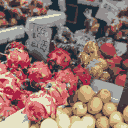
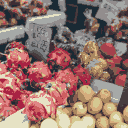
However, the 2nd output, created from the same exact image in RGBA mode, has far worse results, with noticeable gray blotches and loss of detail.
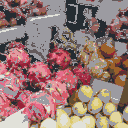
All 3 outputs have 16 colors as expected, there is not a shortage of colors like in #5204
What are your OS, Python and Pillow versions?
- OS: Ubuntu 20.04 (Kubuntu)
- Python: 3.9.1 (via pyenv)
- Pillow: 8.1.0