Releases: oobabooga/textgen
v4.8

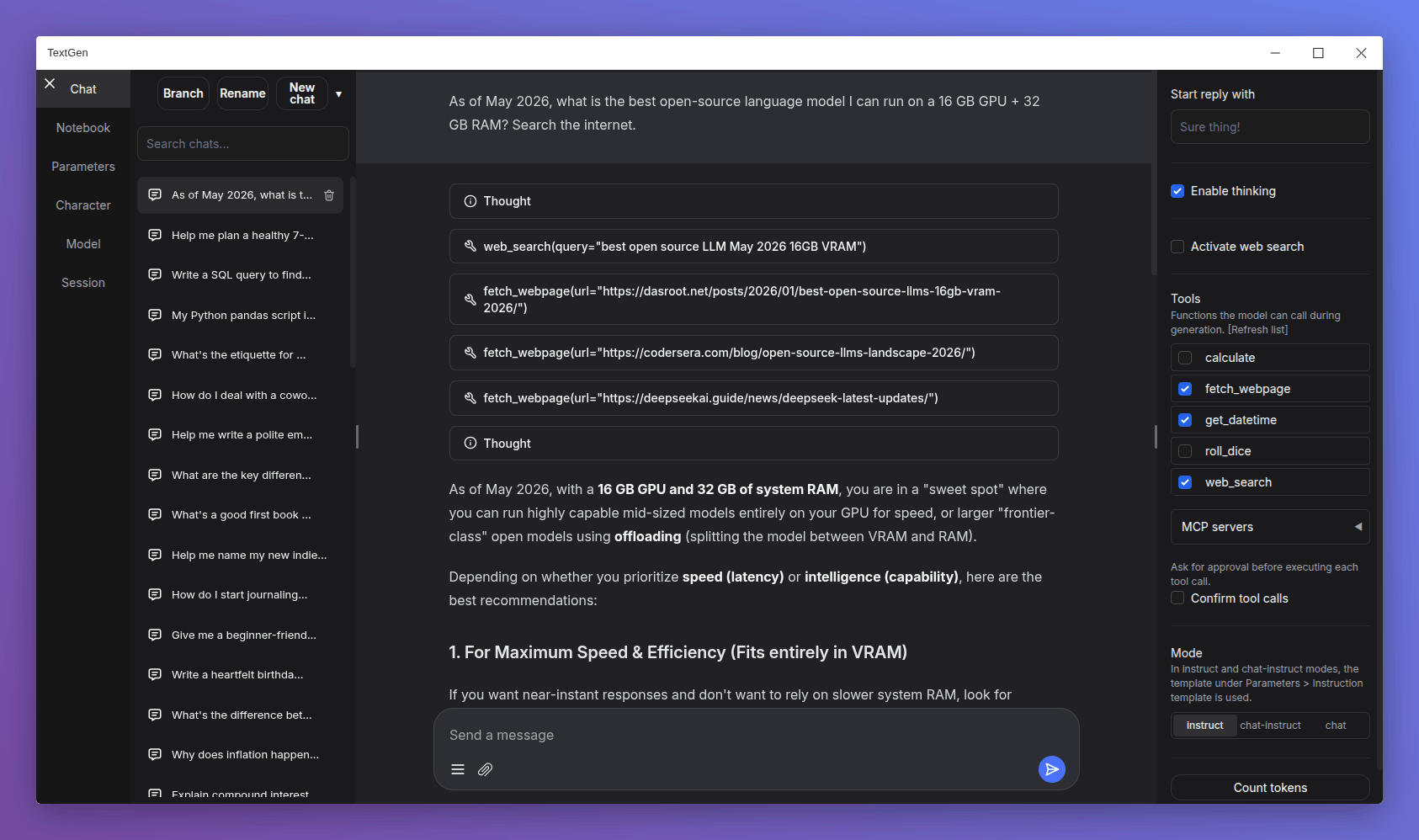
Changes
- Redesigned chat composer: Taller input area with the paperclip and message-action buttons pinned to the bottom, similar to Gemini and DeepSeek.
- Smooth scroll animation when sending a new message: Inspired by Gemini's chat UI.
- Electron improvements:
- Persist window bounds and maximize state across launches.
- Add a
--no-electronflag to skip the desktop window and use the web UI in the browser instead. - Disable spellcheck in the chat input.
- API: Add support for list-format content in tool and assistant messages.
- Add more space below the last chat/chat-instruct message so its action buttons have breathing room.
Bug fixes
- Electron:
- Fix
--listenmode in the launcher. - Fix missing log colors on Windows.
- Fix big character picture failing to load (#7540).
- Fix
- Fix speculative decoding broken by upstream llama.cpp arg renames (#7541).
- Fix truncation length reverting after model load on UI reload (#7540).
- Don't clear the chat input when sending a message with no model loaded (#7542).
Dependency updates
- Update llama.cpp to ggml-org/llama.cpp@68380ae
- Update ik_llama.cpp to ikawrakow/ik_llama.cpp@9a26522
Portable builds
TextGen is now a desktop app for local LLMs. Download, unzip, double-click.
Note
NVIDIA GPU: If nvidia-smi reports CUDA Version >= 13.1, use the cuda13.1 build. Otherwise, use cuda12.4.
ik_llama.cpp is a llama.cpp fork with new quant types. If unsure, use the llama.cpp column.
Windows
| GPU/Platform | llama.cpp | ik_llama.cpp |
|---|---|---|
| NVIDIA (CUDA 12.4) | Download (891 MB) | Download (1.23 GB) |
| NVIDIA (CUDA 13.1) | Download (817 MB) | Download (1.33 GB) |
| AMD/Intel (Vulkan) | Download (336 MB) | — |
| AMD (ROCm 7.2) | Download (604 MB) | — |
| CPU only | Download (319 MB) | Download (334 MB) |
Linux
| GPU/Platform | llama.cpp | ik_llama.cpp |
|---|---|---|
| NVIDIA (CUDA 12.4) | Download (848 MB) | Download (1.20 GB) |
| NVIDIA (CUDA 13.1) | Download (803 MB) | Download (1.33 GB) |
| AMD/Intel (Vulkan) | Download (324 MB) | — |
| AMD (ROCm 7.2) | Download (396 MB) | — |
| CPU only | Download (307 MB) | Download (334 MB) |
macOS
| Architecture | llama.cpp |
|---|---|
| Apple Silicon (arm64) | Download (271 MB) |
| Intel (x86_64) | Download (283 MB) |
Updating a portable install:
- Download and extract the latest version.
- Replace the
user_datafolder with the one in your existing install. All your settings and models will be moved.
Starting with 4.0, you can also move user_data one folder up, next to the install folder. It will be detected automatically, making updates easier:
textgen-4.6/
textgen-4.7/
user_data/ <-- shared by both installsv4.7.3
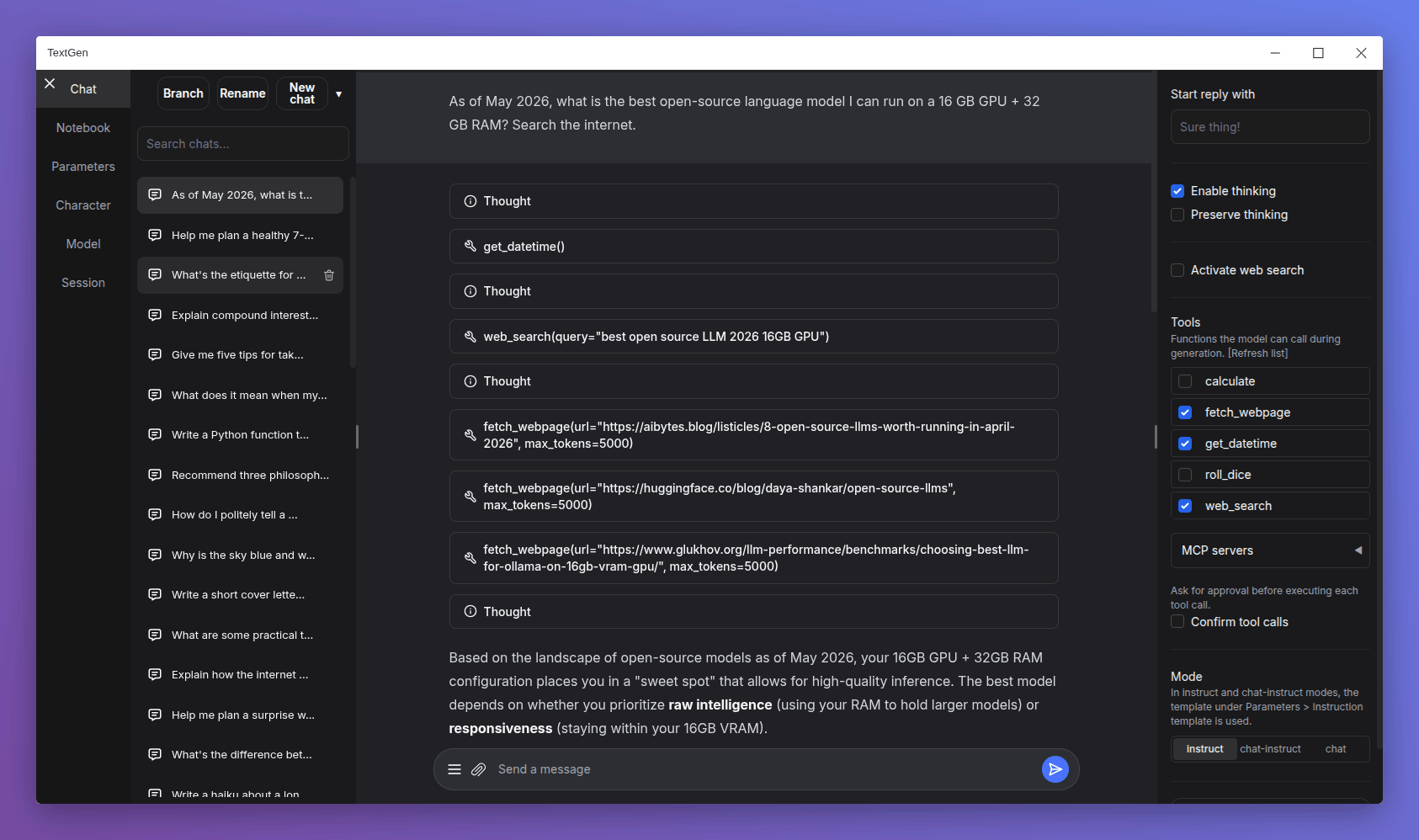
Changes
- Native desktop app: Portable builds now bundle Electron and open as a native window. Run
textgen/textgen.batinstead of the previous start scripts. Pass--listenor--nowebuito skip the window and run the server directly. - Major UI overhaul:
- Replace Noto Sans with Inter as the default font.
- Replace emoji refresh/save/delete buttons with Lucide SVG icons.
- Turn the chat mode selector (chat / chat-instruct / instruct) into a 3-button segmented control.
- Redesign the chat input as a single rounded card with a circular accent-colored send button.
- Use a flat underline for the active tab indicator.
- Replace the sidebar toggle buttons with 3px hairline handles on desktop.
- Tensor parallelism for llama.cpp: New
--split-modeflag (replacing--row-split) with atensoroption that can make multi-GPU inference 60%+ faster. On the ik_llama.cpp backend,tensorandrowfall back tograph. - Replace DuckDuckGo HTML scraping in the web search tool with the ddgs library, which is more robust against DuckDuckGo's bot blocking.
- Add support for standalone
.jinja/.jinja2instruction template files in the UI, in addition to the existing.yamlformat (#7517).
Bug fixes
- Fix Stop button being ignored during tool call approval, and not interrupting between tool turns in multi-turn tool loops.
- Fix race condition in the ExLlamaV3 backend that could affect concurrent API requests.
- Fix extension settings not saving for extensions inside
user_data/extensions(#7525).
Dependency updates
- Update llama.cpp to ggml-org/llama.cpp@0929436
- Update ik_llama.cpp to ikawrakow/ik_llama.cpp@9f1deef
- Update transformers to 5.6
Portable builds
TextGen is now a desktop app for local LLMs. Download, unzip, double-click.
Note
NVIDIA GPU: If nvidia-smi reports CUDA Version >= 13.1, use the cuda13.1 build. Otherwise, use cuda12.4.
ik_llama.cpp is a llama.cpp fork with new quant types. If unsure, use the llama.cpp column.
Windows
| GPU/Platform | llama.cpp | ik_llama.cpp |
|---|---|---|
| NVIDIA (CUDA 12.4) | Download (891 MB) | Download (1.23 GB) |
| NVIDIA (CUDA 13.1) | Download (816 MB) | Download (1.33 GB) |
| AMD/Intel (Vulkan) | Download (336 MB) | — |
| AMD (ROCm 7.2) | Download (604 MB) | — |
| CPU only | Download (318 MB) | Download (334 MB) |
Linux
| GPU/Platform | llama.cpp | ik_llama.cpp |
|---|---|---|
| NVIDIA (CUDA 12.4) | Download (848 MB) | Download (1.20 GB) |
| NVIDIA (CUDA 13.1) | Download (803 MB) | Download (1.32 GB) |
| AMD/Intel (Vulkan) | Download (324 MB) | — |
| AMD (ROCm 7.2) | Download (395 MB) | — |
| CPU only | Download (306 MB) | Download (334 MB) |
macOS
| Architecture | llama.cpp |
|---|---|
| Apple Silicon (arm64) | Download (271 MB) |
| Intel (x86_64) | Download (283 MB) |
Updating a portable install:
- Download and extract the latest version.
- Replace the
user_datafolder with the one in your existing install. All your settings and models will be moved.
Starting with 4.0, you can also move user_data one folder up, next to the install folder. It will be detected automatically, making updates easier:
textgen-4.6/
textgen-4.7/
user_data/ <-- shared by both installsv4.7.2
v4.7.1
v4.7
v4.6.2
Changes
- Tool call confirmation: Add inline approve/reject/always-approve buttons that appear before each tool call is executed. Enable via the new "Confirm tool calls" checkbox in the Chat tab.
- Stdio MCP server support: In addition to HTTP MCP servers, you can now configure local subprocess-based MCP servers via
user_data/mcp.json, using the same format as Claude Desktop and Cursor. [Tutorial] preserve_thinkingchat template parameter: New UI checkbox and--preserve-thinkingCLI flag to control whether thinking blocks from prior turns are kept in the context.- UI: Sidebars overhaul: Sidebars now toggle independently and persist their state on page refresh. Default visibility adapts to viewport width.
- llama.cpp: Pass
--draft-min 48by default for draftless speculative decoding. - Only show the "Reasoning effort" and "Enable thinking" controls for models whose chat template actually uses them.
- Cache MCP tool discovery to avoid re-querying servers on each generation.
- Add model download branch handling in download_model_wrapper (#7506). Thanks, @Th-Underscore.
- UI: Improve border colors in light theme, fix code block copy button colors and centering, fix code block scrollbar flash during page load, improve past chats menu spacing.
Security
- Fix SSRF vulnerabilities in URL fetching: add backslash and userinfo rejection, validate every redirect hop.
Bug fixes
- Fix Gemma 4 thinking tags not hidden after tool calls (#7509).
- Fix GPT-OSS channel tokens leaking in UI after tool calls.
- Fix Slider preprocess not handling None from cleared number input. 🆕 - v4.6.1.
- llama.cpp: Fix multimodal by using server's random media marker. 🆕 - v4.6.1.
Dependency updates
- Update llama.cpp to ggml-org/llama.cpp@6217b49
- Update ik_llama.cpp to ikawrakow/ik_llama.cpp@286ce32
- Update ExLlamaV3 to 0.0.30
Portable builds
Below you can find self-contained packages that work with GGUF models (llama.cpp) and require no installation! Just download the right version for your system, unzip/extract, and run.
Note
NVIDIA GPU: If nvidia-smi reports CUDA Version >= 13.1, use the cuda13.1 build. Otherwise, use cuda12.4.
ik_llama.cpp is a llama.cpp fork with new quant types. If unsure, use the llama.cpp column.
Windows
| GPU/Platform | llama.cpp | ik_llama.cpp |
|---|---|---|
| NVIDIA (CUDA 12.4) | Download (766 MB) | Download (1.1 GB) |
| NVIDIA (CUDA 13.1) | Download (686 MB) | Download (1.19 GB) |
| AMD/Intel (Vulkan) | Download (196 MB) | — |
| AMD (ROCm 7.2) | Download (499 MB) | — |
| CPU only | Download (178 MB) | Download (194 MB) |
Linux
| GPU/Platform | llama.cpp | ik_llama.cpp |
|---|---|---|
| NVIDIA (CUDA 12.4) | Download (747 MB) | Download (1.09 GB) |
| NVIDIA (CUDA 13.1) | Download (696 MB) | Download (1.21 GB) |
| AMD/Intel (Vulkan) | Download (208 MB) | — |
| AMD (ROCm 7.2) | Download (307 MB) | — |
| CPU only | Download (190 MB) | Download (217 MB) |
macOS
| Architecture | llama.cpp |
|---|---|
| Apple Silicon (arm64) | Download (156 MB) |
| Intel (x86_64) | Download (162 MB) |
Updating a portable install:
- Download and extract the latest version.
- Replace the
user_datafolder with the one in your existing install. All your settings and models will be moved.
Starting with 4.0, you can also move user_data one folder up, next to the install folder. It will be detected automatically, making updates easier:
text-generation-webui-4.0/
text-generation-webui-4.1/
user_data/                    <-- shared by both installs
Contributors

Assets 20
v4.6.1
v4.6
v4.5.2
Changes
- The project has been renamed to TextGen! The GitHub URL is now github.com/oobabooga/textgen.
- Logits display improvements (#7486). Thanks, @wiger3.
- UI: Add sky-blue color for quoted text in light mode (#7473). Thanks, @Th-Underscore.
- Reduce VRAM peak in prompt logprobs forward pass.
Bug fixes
- Fix Gemma-4 tool calling: handle double quotes and newline chars in arguments (#7477). Thanks, @mamei16.
- Fix chat scroll getting stuck on thinking blocks (#7485).
- Prevent Tool Icon SVG Shrinking When Tool Calls Are Long (#7488). Thanks, @mamei16.
- Fix: wrong chat deleted when selection changes before confirm (#7483). Thanks, @lawrence3699.
- Fix bos/eos tokens not being set for models without a chat template. Defaults are now reset before reading model metadata.
- Fix duplicate BOS token being prepended in ExLlamav3.
- Fix version metadata not syncing on Continue (#7492).
- Fix
row_splitnot working with ik_llama.cpp —--split-mode rowis now converted to--split-mode graph(#7489). - Fix "Start reply with" crash (#7497). 🆕 - v4.5.1.
- Fix tool responses with Gemma 4 template (#7498). 🆕 - v4.5.1.
- UI: Fix consecutive thinking blocks rendering with Gemma 4. 🆕 - v4.5.1.
- Fix bos/eos tokens being overwritten after GGUF metadata sets them (#7496). 🆕 - v4.5.2
Dependency updates
- Update llama.cpp to ggml-org/llama.cpp@5d14e5d
- Update ik_llama.cpp to ikawrakow/ik_llama.cpp@47986f0
Portable builds
Below you can find self-contained packages that work with GGUF models (llama.cpp) and require no installation! Just download the right version for your system, unzip/extract, and run.
Note
NVIDIA GPU: If nvidia-smi reports CUDA Version >= 13.1, use the cuda13.1 build. Otherwise, use cuda12.4.
ik_llama.cpp is a llama.cpp fork with new quant types. If unsure, use the llama.cpp column.
Windows
| GPU/Platform | llama.cpp | ik_llama.cpp |
|---|---|---|
| NVIDIA (CUDA 12.4) | Download (774 MB) | Download (1.09 GB) |
| NVIDIA (CUDA 13.1) | Download (696 MB) | Download (1.19 GB) |
| AMD/Intel (Vulkan) | Download (209 MB) | — |
| AMD (ROCm 7.2) | Download (517 MB) | — |
| CPU only | Download (191 MB) | Download (192 MB) |
Linux
| GPU/Platform | llama.cpp | ik_llama.cpp |
|---|---|---|
| NVIDIA (CUDA 12.4) | Download (758 MB) | Download (1.09 GB) |
| NVIDIA (CUDA 13.1) | Download (710 MB) | Download (1.21 GB) |
| AMD/Intel (Vulkan) | Download (225 MB) | — |
| AMD (ROCm 7.2) | Download (330 MB) | — |
| CPU only | Download (207 MB) | Download (218 MB) |
macOS
| Architecture | llama.cpp |
|---|---|
| Apple Silicon (arm64) | Download (182 MB) |
| Intel (x86_64) | Download (188 MB) |
Updating a portable install:
- Download and extract the latest version.
- Replace the
user_datafolder with the one in your existing install. All your settings and models will be moved.
Starting with 4.0, you can also move user_data one folder up, next to the install folder. It will be detected automatically, making updates easier:
text-generation-webui-4.0/
text-generation-webui-4.1/
user_data/                    <-- shared by both installs

