
This is a script which creates an openbox dynamic menu allowing you to view current tmux sessions as well as launch terminals attaching to them. It currently lists the name of the session and the number of windows the session contains. There is also an icon which indicates if anything is currently attached to that session or not.
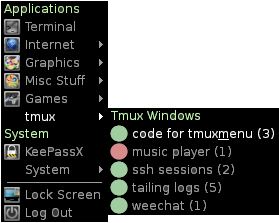
Clone a copy of this repo somewhere. I prefer to use ~/.config/openbox/scripts. Then, in menu.xml, you can use this line to add the menu where you want it.
<menu id="tmux" label="tmux" execute="/path/to/repo/tmux_menu/tmux_menu.py" />
Create a file config.py and set the following variables in it. For execute_str, {} is where you want the session name to be in the command.
attached_icon = '/path/to/tmux_menu/icons/green.png'
dettached_icon = '/path/to/tmux_menu/icons/red.png'
execute_str =  '/usr/bin/urxvt -e bash -c "tmux attach-session -t {}"'
Here are some sample execute commands to attach using various terminal emulators. Most VTs take '-e' as an argument for execute, so ones not listed here will likely be similar.
xterm
/usr/bin/xterm -e bash -c "tmux attach-session -t {}"
urxvt
/usr/bin/urxvt -e bash -c "tmux attach-session -t {}"
gnome-terminal
/usr/bin/dbus-launch /usr/bin/gnome-terminal -e "bash -c 'tmux attach-session -t {}'"
lxterminal
/usr/bin/lxterminal -e "bash -c 'tmux attach-session -t {}'"
This is released under the MIT license.