Need to change linux versions from Upstart to just running the script or using init.d instead. Too many conflicts with Canonical's Upstart...
WiFi hotspot setup script for Ubuntu 12.10+
Start the script::
$ ./Myspotishot.sh
If for some chance it is not executable::
$ chmod u+x Myspotishot.sh
The script will guide you through the setup.
After finishing with the setup you should have an Upstart job available. You can start the hotspot the following way:
$ sudo start myspotishot
or
$ sudo sh /usr/sbin/myspotishot.sh
Stop the hotspot:
$ sudo stop myspotishot
Check the status:
$ sudo status myspotishot
TO-DO:
- adding the option to make the service run at system startup
- check for available wlan adapters and choose one
- check for ethernet adapter connecting to the internet
- tbd
Download MySpotIsHot.bat
Right click, run as Administrator and follow the setup instructions. It should guide you through :).
Ubuntu 13.04
Runs with gtkdialog!
For ubuntu users, haven't tried for other gnome users, to do everything automatically CTRL-ALT-T to open terminal and paste this in::
wget https://raw.github.com/Krofek/MySpotIsHot/master/installgui.sh && chmod +x installgui.sh && ./installgui.sh
This will download the application, create a menu item, make a policy for launching with pkexec. After the setup finishes, you should be able to launch the application via the menu (MySpotIsHot - inculdes an ugly icon) or by typing in the console::
pkexec myspotishot
This should be it.
Install required packages:
* GtkDialog 0.8.3
If you need to install gtkdialog manually:
svn checkout http://gtkdialog.googlecode.com/svn/trunk/ gtkdialog
cd gtkdialog
./autogen.sh
make
sudo make install
Fom compiling and installing gtkdialog, you'll probably need:
* autoconf
* libgtk2.0-dev
* bison
MySpotIsHotGUI needs the following packages:
* hostapd
* dnsmasq
* iw
Either clone the entire repo:
git clone https://github.com/Krofek/MySpotIsHot.git
or download just the GUI script:
wget https://raw.github.com/Krofek/MySpotIsHot/master/MySpotIsHotGUI.sh
Run script as root!
# sh MySpotIsHotGUI.sh
Screenshot:
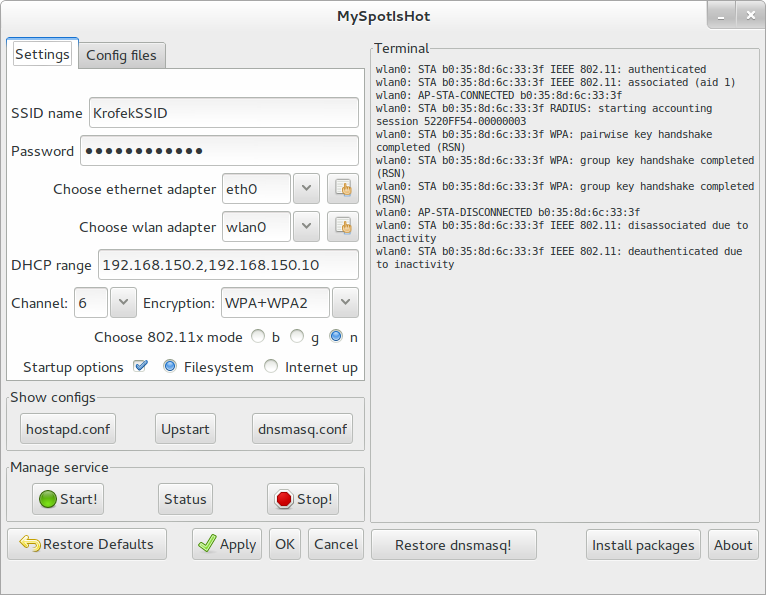


TO-DO:
- nicer and better button positions
- grey out wlan adapter combobox if wlan adapter doesnt support AP mode (also popup window shows with text saying it)
- if you have any suggestions about anything
- Advenced option: remain authenticated, locales, ht capabilities (HT20, HT40, etc), make invisible, more
- ban mac adress